- Data Recovery
- Data Recovery for PC
- Data Recovery for Android
- Data Recovery for iPhone/iPad
- Unlock For Android
- Unlock for iPhone/iPad
- Android System Repair
- iPhone/iPad System Repair

Updated By Soha On Dec 13, 2025, 9:32 pm
"I accidentally forgot my password. How can I unlock my Vivo smartphone?"
Vivo, as a brand with a considerable market share in the Android smartphone market, has a wide user base worldwide. However, many users may encounter situations where they are unable to access their various functions due to accidentally forgetting the PIN code, password or pattern screen lock. So, how can one unlock their Vivo smartphone without entering a password? Next, let's explore together how to unlock a Vivo phone without losing data.
Understanding the scenarios where you need to unlock a Vivo phone can help you avoid similar situations. So, let's take a look together at what specific situations are included. For instance, it might be that the password is forgotten, or it could be that a pre-configured phone is obtained but the credentials used for configuration and other operations cannot be obtained.
1. Forget the password, PIN code or pattern
This is the most common situation. When users are using the screen lock function of Vivo mobile phones, they accidentally forget the password, PIN code or the pattern used to lock the phone. After all, nowadays we use a wide variety of devices. Even if we always keep our passwords in mind, we might occasionally forget the correct password combination due to a momentary oversight.
2. Purchase second-hand mobile phones
If you receive a mobile phone with a pre-configured Google ID, you will be in a predicament where you cannot use the various functions of the mobile phone normally. Therefore, when you decide to purchase a second-hand Vivo mobile phone, be sure to ask the seller to clear all the configuration information in the phone that requires its ID and password.
3. Attacked by a virus
Malicious software is also a major culprit that leads to Vivo phones being locked and inaccessible. These malicious software often disguise themselves as seemingly useful programs, but in fact they are viruses that may lock your mobile phone. Once a mobile phone is locked, virus developers may ask you for money or other important information on the condition of unlocking the phone.
If your Vivo phone is unfortunately locked, don't worry. Now let's explore how to unlock it without a password. Here, all feasible methods will be introduced, and their advantages and disadvantages will be analyzed to help you find the most suitable unlocking method for yourself.
Google's search for my device is a rather effective way to unlock the screen lock of a Vivo phone. When your mobile phone is accidentally stolen or illegally accessed, using this method can also prevent the phone from being further manipulated. However, to restore the screen lock of a Vivo phone using this method, the prerequisite is that your phone must have been logged in with a Google account. But its drawback is also obvious, that is, it will clear all the data on the mobile phone. The specific operation steps are as follows:
Step 1 Open a browser on any other device and log in to the Android Device Manager using the Google account credentials configured on the Vivo phone.
Step 2 After successfully logging in, you will see three options. Select Erase Device to unlock your Vivo phone.
Step 3 Click "Erase All Data" and "Erase" in sequence. The system will restore your Vivo phone by deleting the locked pins or patterns, but all data on the phone will also be cleared at the same time.
If you have already set verification questions in the security Settings of your Google account, when you encounter a screen lock issue on your Vivo phone, you can quickly restore your phone's access rights by answering these questions. The specific operation is as follows:
Step 1 After entering the incorrect Vivo screen lock password several times, when the option "Forgot PIN/ Password" or "Forgot Mode" appears on the screen, click on this option. In the next step, select the "Answer the Question" option.
Step 2 Answer the Google security questions you configured previously on the next screen. As long as you answer these questions correctly, you can bypass the screen lock of your Vivo phone and regain access to it.
If you forget the screen lock password of your Vivo phone but still remember the details of your Google account, you are really lucky. In this case, you can easily unlock your smartphone through your Google account. The detailed operation steps are presented to you below.
Step 1 After you enter the incorrect Vivo screen lock password multiple times, the "Forget Mode" option will appear on the Vivo phone screen. At this point, you just need to click on this "Forget Mode" option.
Step 2 Select the option "Enter Google account details". Then, log in using the Google account credentials you configured on your mobile phone. After a successful login, the screen lock of the mobile phone will be released.
Step 3 Don't forget to set a new password for the lock screen of your Vivo phone to ensure its security.
Hard reset is also a way to solve the problem of "how to unlock a Vivo phone". However, it will perform a comprehensive format on the mobile phone, deleting all data and Settings on the phone. The following are the detailed steps to unlock a Vivo phone using a hard reset:
Step 1 Turn off your Vivo phone. Press and hold the following combination keys simultaneously until the Vivo logo appears on the screen: power button + volume up key.
Or press the power button and the volume down key. After entering the corresponding interface, use the volume button to select the language, and then press the power button to confirm.Step 2 Use the volume buttons to scroll through the options to start the screen lock recovery process of the Vivo phone, and confirm the recovery options through the power button.
Step 3 In the recovery options, select the "Erase Data/Restore Factory Settings" option, and then choose the "Yes - Delete All User Data" option.
Step 4 Select the "Reboot System" option in the pop-up window. The phone will then restart and complete the unlocking, but all previous data will be lost.
If none of the methods mentioned earlier work or you think they are too complicated to operate, then Geekersoft Android Screen Unlocker is undoubtedly your excellent choice. This tool has a user-friendly interface and is easy to operate. It can be perfectly adapted to both Windows and Mac systems. Moreover, it supports unlocking all mainstream brands of smartphones on the market, including Samsung, Huawei, Xiaomi, etc.
With tools like Geekersoft Android Screen Unlocker, you don't need to have any professional technical background. You can easily complete the operation with an intuitive interface and simple steps. More importantly, it is currently one of the best programs for restoring access rights to Vivo mobile phones without losing data. Next, let's take a detailed look at the specific process of unlocking the Vivo screen using this tool.
Step 1 Go to the official website of Geekersoft Android Unlocker, download and install the corresponding screen lock unlocking program. After the installation is complete, start the program on your computer and then select the "Screen Unlock" option on the main interface.
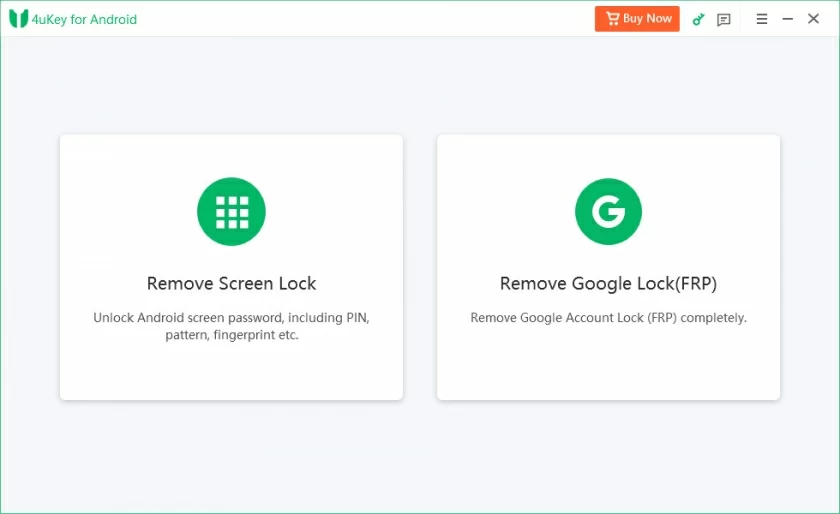
Step 2 Use a USB data cable to connect your Vivo phone to the computer, and then select the "Unlock Android Screen" option. In the given list of smart phone brands, find and select "Vivo".
Step 3 Follow the prompts to enter the specific mode, and the program will start to restore your phone. After downloading the relevant files, just click the "Delete Now" button. Wait for a moment. In just a few minutes, your mobile phone will be able to regain access successfully.
The above are several methods for unlocking a Vivo phone that we have introduced to you. You can easily use any of the above methods to restore access to the device. However, when choosing an unlocking method, it is crucial to analyze the advantages and disadvantages of each method based on one's own needs. The reason why we recommend Geekersoft Android Screen Unlocker is that it is easy to operate and understand, and its functions are also very comprehensive. This is a reliable tool that can greatly simplify the unlocking process. If you want to learn more about the Geekersoft Android Screen Unlocker, you can visit its official website.